What it is
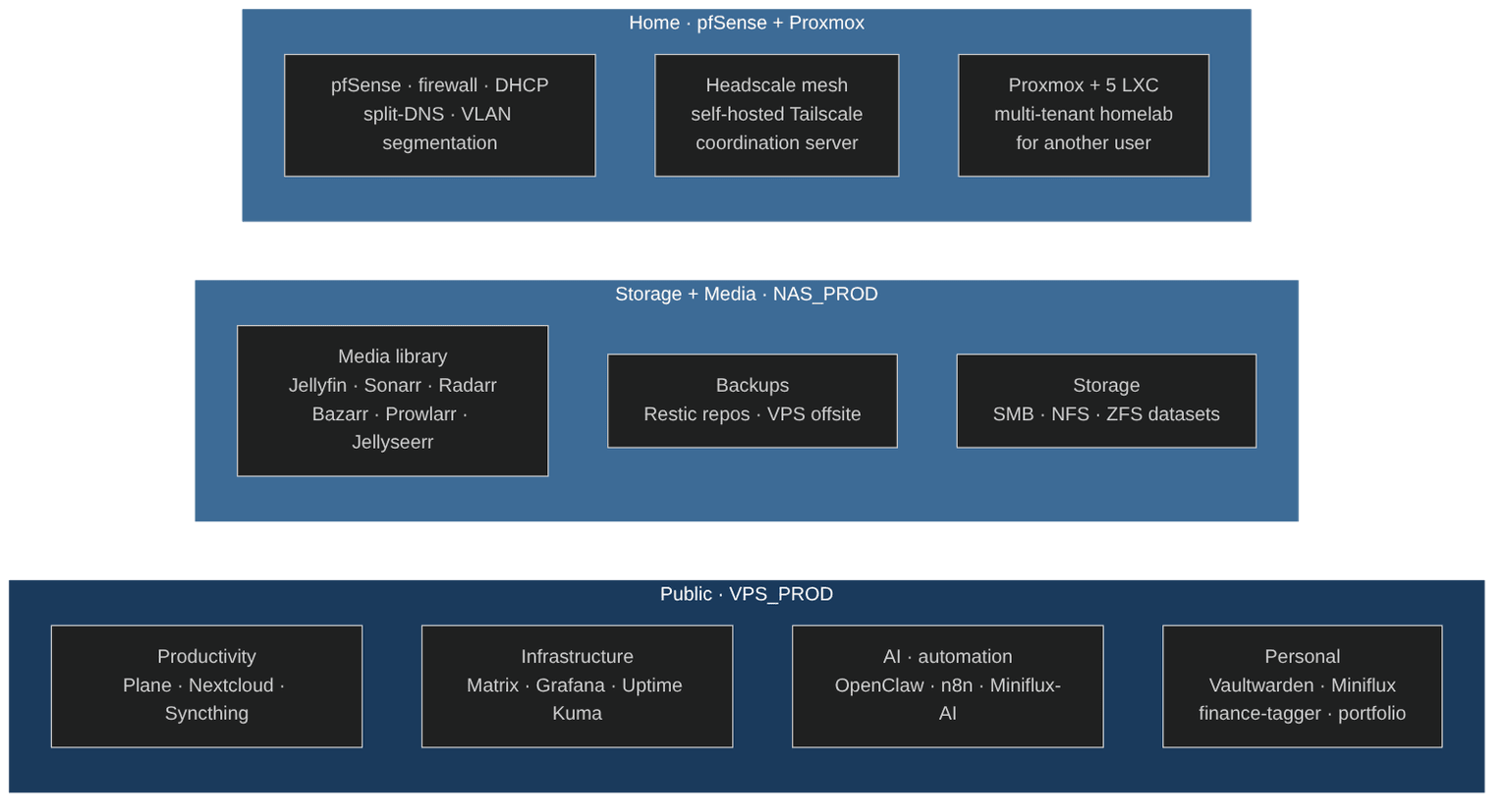
The running instance of my NixOS IaC: a 9-node production homelab spanning a public VPS (Netcup), a ZFS NAS, Proxmox LXC containers, and every personal device I own — all declared from one flake, all instrumented, all backed up, all reachable over a self-hosted mesh VPN. The platform I actually operate every day.
Why it exists
I wanted one system that's both my daily workstation environment (desktops, laptops, macOS) and a real production platform (public services, persistent data, multi-tenant hosting for another user) — not two separate worlds. The homelab has to survive reboots, power cuts, mesa upgrades, hardware migrations (TrueNAS → NixOS recently), and my own mistakes. Every operational detail needs to be declarative, observable, and recoverable from the flake without manual steps.
The second driver is operational discipline. A homelab nobody monitors is a toy. If I'm going to host my friend's LXCs, my own password vault, my RSS reader, and my AI agent gateway, the reliability story has to match a small-business IT stack: alerts when things break, backups I can verify, a documented runbook for every recurring issue.
Architecture
Observability lives at the center: a Prometheus + Grafana stack on the VPS scrapes 10+ exporters across the fleet, Uptime Kuma runs independent HTTP probes, and failure events flow to a Telegram bot so I know before users do. Backups are Restic-encrypted, scheduled hourly and daily, and shipped offsite to the NAS over Tailscale SFTP.
What I built
- 14 Docker Compose stacks on the VPS (~15+ containers), all rootless — Plane (project management), Matrix + Element (federated chat), Nextcloud (file sync with MariaDB), Syncthing, Miniflux + Miniflux-AI (RSS + Gemini-summarized), Uptime Kuma, UniFi controller, n8n, OpenClaw (AI gateway), Miniflux-AI, finance-tagger (Flask + htmx), portfolio, romm + calibre (content). Rootless Docker keeps the container runtime unprivileged; NixOS module wires per-stack network namespaces, health checks, log rotation, and systemd dependency ordering.
- NAS migration from TrueNAS SCALE to NixOS (Mar 2026) — ZFS pool import (encrypted datasets unlocked at boot via systemd-unlock), 21 Docker containers re-hosted as rootless (Jellyfin + Sonarr/Radarr/Bazarr/Prowlarr/Jellyseerr media stack, gluetun VPN namespace for qBittorrent, Exportarrs for media-stack metrics, Nginx Proxy Manager, Cloudflared). Sleep schedule (23:00–11:00 S3 suspend) coordinated with systemd pre-suspend / post-resume hooks for graceful Docker stop/start. 10GbE LACP bonding with NIC ring-buffer tuning.
- Multi-tenant PostgreSQL 17 — 6 databases in one cluster (Plane, Rails, Matrix, Miniflux, Vaultwarden, n8n) with per-container SCRAM-SHA-256 ACLs in a custom
pg_hba.conf. PgBouncer transaction pooler (20 default pool, 1,000 max clients). Hourly + daily dumps via Restic, offsite to NAS over Tailscale SFTP. - Observability stack — Prometheus + Grafana + 10+ exporters (node, blackbox, SNMP for managed switch, Proxmox PVE exporter over SSH token, postgres, mariadb, redis, cadvisor). Custom dashboards per service group. Telegram alerts for critical events (service down, backup failure, TLS near expiry). Uptime Kuma fronts the public status page.
- Self-hosted network layer — pfSense firewall with VLAN segmentation (LAN, STORAGE_VLAN 192.168.20.0/24, GUEST) and split-DNS. WireGuard site-to-site tunnel VPS ↔ pfSense (172.26.5.0/24 ↔ 192.168.8.0/24). Headscale as a self-hosted Tailscale coordination server so the mesh doesn't depend on a SaaS. Cloudflare Tunnel replaced by a Nginx-on-VPS reverse proxy running through WireGuard — fewer moving pieces, same edge protection.
- Postfix SMTP relay + Telegram — native Postfix forwards through SMTP2GO (replacing the old LXC_mailer). systemd failure hooks push both email and Telegram notifications; the infra alert bot runs on the VPS.
- Multi-tenant homelab template — 5 Proxmox LXCs (database, mailer, monitoring, proxy, tailscale) for another user, built from
KOMI_LXC-base-config.nix+ per-host overrides. Same security baseline as my own infra; different tenant, different secrets. - Rootless-Docker DNS reliability fix — diagnosed a recurring drift where
slirp4netnscaches DNS at daemon start and never refreshes; wrote a weekly systemd timer that restarts the rootless Docker daemon on VPS, NAS, and (when active) home Docker hosts. Documented the root cause + the runbook.
Results
- 9 NixOS-managed nodes in my own homelab (desktops, laptops, VPS, NAS, personal LXCs) plus 5 multi-tenant LXCs for another user, all derived from the single flake in
my-nixos-infrastructure. - 14 Docker Compose stacks on the VPS (~15+ rootless containers) and 21 containers on the NAS (media + storage + monitoring).
- 10+ Prometheus exporters feeding custom Grafana dashboards; Telegram alert channel for incidents.
- Restic-encrypted backups hourly + daily, offsite to NAS over Tailscale SFTP.
- PostgreSQL 17 multi-tenant — 6 databases, per-container ACLs, PgBouncer pooling.
- TrueNAS → NixOS migration of the NAS with zero data loss, 21 services re-deployed, ZFS datasets preserved.
Stack
NixOS, Nix flakes, Docker (rootless), Docker Compose, pfSense, WireGuard, Tailscale, Headscale, Nginx, Cloudflare Tunnel, PostgreSQL 17, PgBouncer, MariaDB, Redis, Prometheus, Grafana, Uptime Kuma, Restic, Postfix + SMTP2GO, Matrix Synapse, Plane, Nextcloud, Jellyfin (+ Sonarr/Radarr/Bazarr/Prowlarr/Jellyseerr), Proxmox LXC, ZFS.
Status
- Repo: private — the flake is the same one referenced in
my-nixos-infrastructure. - Running daily: my workstations, laptops, a production VPS, a ZFS NAS, 5 Proxmox LXCs for a friend's multi-tenant homelab.
- Uptime: public status dashboard on Uptime Kuma; Telegram alert channel for incidents.
- Related portfolio entries:
my-nixos-infrastructure(the codebase),vps-wireguard(the networking layer).